Internal tools: small fixes for slow work
Most of what I build starts as a step in my own job that takes too long or goes wrong too often. These run inside a customer success team at a wind inspection company, so the tools stay private. What they do, how they work and where they fall short is here.
What they have in common
Fix the slow step
Each one began as a task I did by hand often enough to know exactly where it broke.
Flag, don't guess
When a tool isn't sure, it hands the item to a person instead of filling in a value.
Say where it stops
Every entry below names what the tool can't do yet, alongside what it does.
PO intake workflow
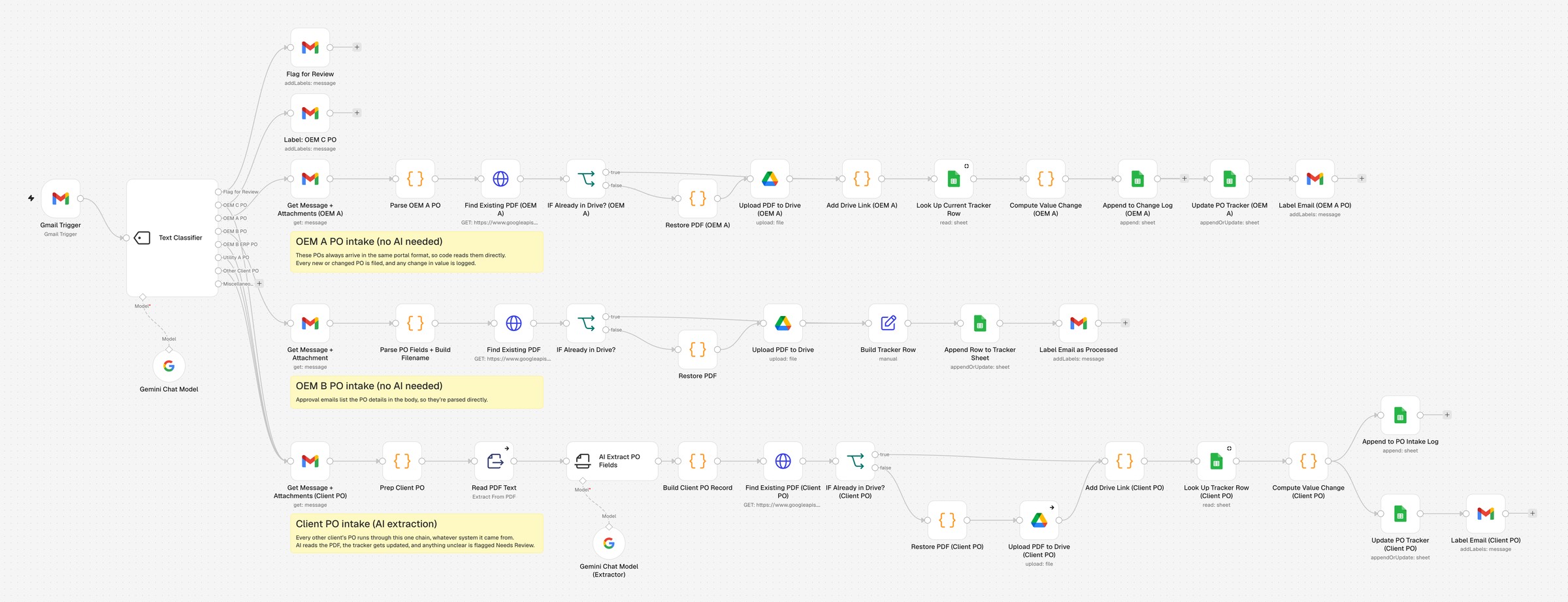
Every client sends purchase orders a different way. One workflow now reads them, files them and logs them.
Wind clients send POs through procurement portals, ERP emails, e-signature services, approval notices and plain PDF attachments. Each one used to be handled by hand: download it, rename it, file it, then enter the same details in more than one place. POs waited when the team was busy, file names never matched, and when a revised PO changed the dollar amount, nothing flagged it.
How it works
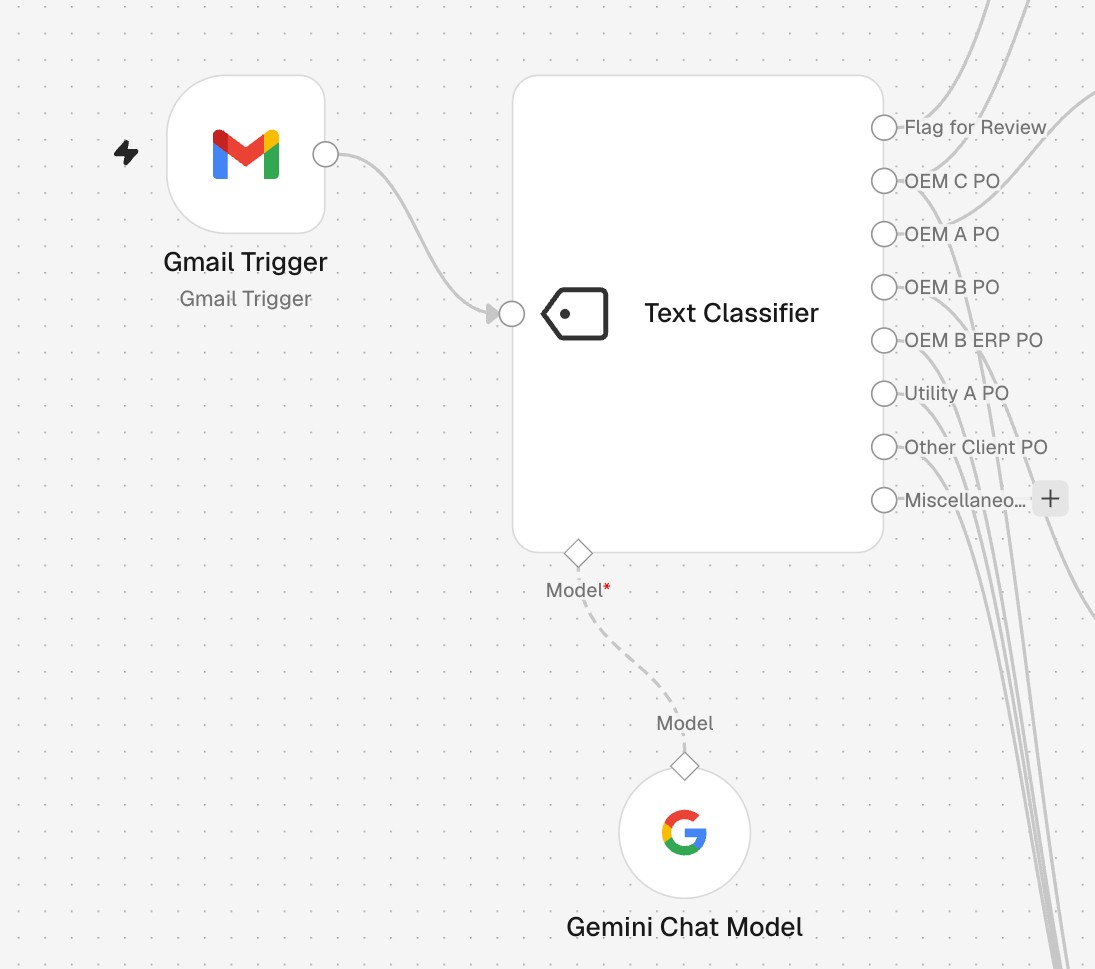
- A new email arrives, and an AI classifier decides what it is: a PO from a particular client, something a person should look at, or nothing to act on.
- Clients whose POs always arrive in the same fixed format go down a path where code reads them directly. No AI is needed there, so none is used.
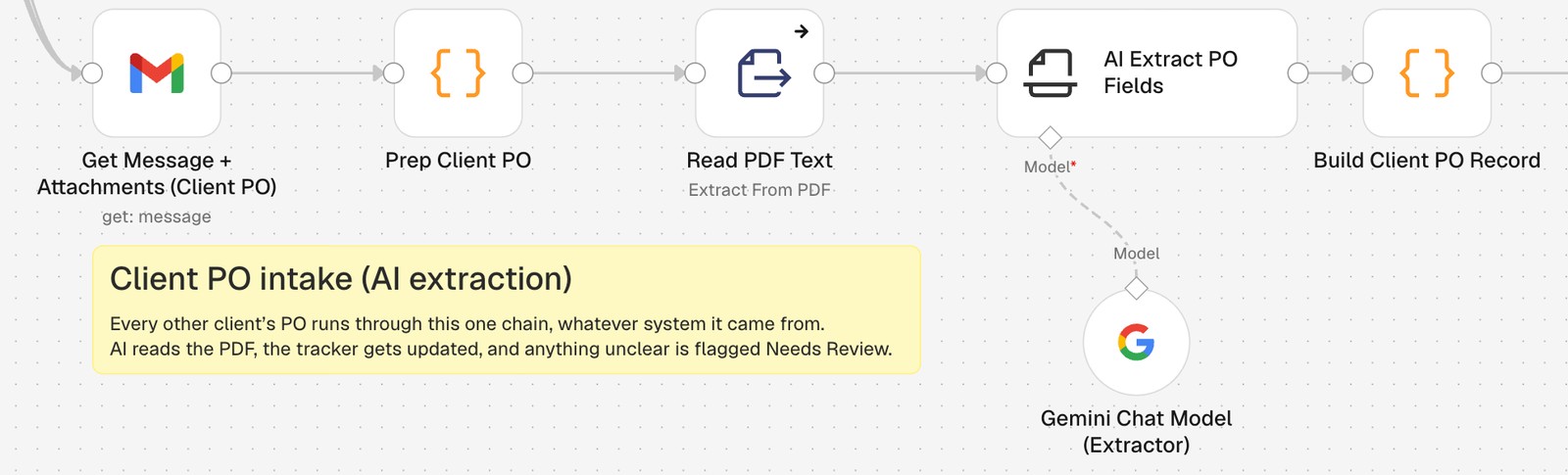
- Every other client's PO goes through one shared chain, where an AI model reads the PDF and pulls out the PO number, site, scope and value.
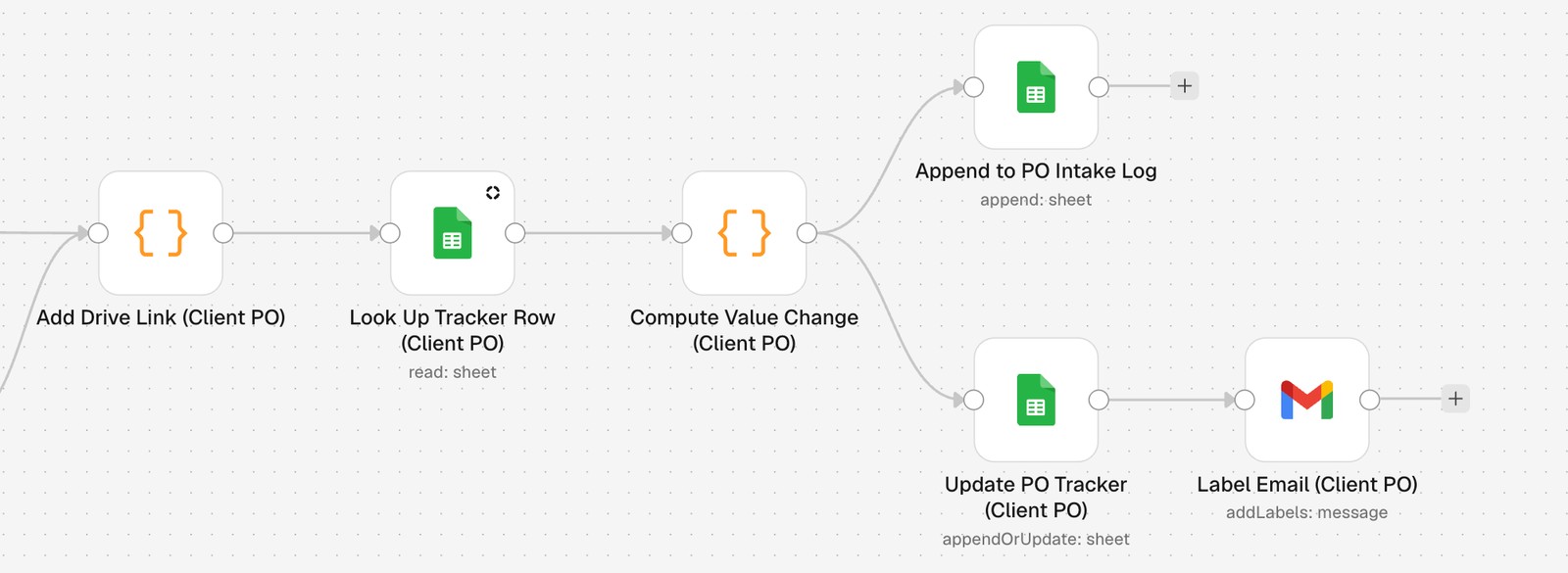
- Before saving, it checks Drive for an existing copy, then files the PDF under one naming convention: client, site, timeline and year, inspection type, PO number.
- It updates the tracker, logs the PO, compares the value with the last version of the same PO, and labels the email as handled.
Decisions and trade-offs
| Decision | Why | What it cost |
|---|---|---|
| AI to sort, code to read where the format is fixed | Code is cheaper and never guesses; AI earns its place where layouts vary | Two kinds of path to maintain |
| One shared AI chain for every other client | Adding a client means a new category and a folder, not a new branch | One set of instructions has to handle many layouts |
| Flag, never guess | A missing PO number or an unreadable value goes to Needs Review | A person still checks every flagged PO |
| Check Drive before saving | Re-runs and forwarded copies don't create duplicate files | One extra lookup per PO |
How it could fail
A bad read can mean a wrong dollar figure on a purchase order, or a PO that never gets filed.
| Failure mode | What the workflow does |
|---|---|
| Reading the wrong PO number or value | A missing number or an unreadable value goes to Needs Review instead of being filled in. Clients with a fixed format skip AI entirely, and code reads their POs. |
| Missing a revised PO's new amount | Checks each PO's value against the last version of the same PO |
| Filing the same PO twice | Checks Drive for an existing copy before saving |
| Filing under the wrong site | Files a site name it doesn't know under a placeholder until someone fixes the mapping |
| A step failing partway through | Retries the step, then emails me |
Where it doesn't hold
- It only sees the team inbox. Some POs still go to a person's own email and have to be forwarded before the workflow can file them.
- Client site names don't match ours. The mapping between them is kept by hand, and a name it doesn't know is filed under a placeholder until someone fixes it.
- A workflow that isn't switched on looks like one that is. After testing, the new version wasn't turned on, and POs that arrived in the meantime needed a catch-up run.
- There is no written runbook. A failed step retries, then emails me, and I troubleshoot it with Claude.
What I'd do differently
- Route every PO to one shared inbox per region from day one.
- Build the duplicate check in from the start, not after the first duplicates.
- Map client site names to ours before adding the second client, not the tenth.
I walked the whole company through it at an all hands in November 2026.
Anomaly Upload Validator
Catches bad inspection data before it reaches customer success.
It checks wind turbine blade inspection findings from outside vendors for required fields and automates the two-step damage taxonomy conversion, taking customer success out of manual validation and engineering off the critical path. The tool stays internal; its five specification documents are published.
Bounding box coordinate calculator
A client's platform needs a box around every anomaly. Datasets from other vendors rarely include one.
Inspection datasets from other vendors usually mark damage as a polygon on the image and leave out the bounding box coordinates the client's platform needs. Datasets went back and forth until someone found them. This Google Apps Script, built with Claude, reads the polygon for each anomaly from its image link and writes the pixel box coordinates into the working sheet.
Engineers doubted it would hold up. What changed their minds was testing it against datasets whose coordinates were already confirmed, including images at different pixel sizes, and showing that the numbers matched.
It has been live since October 2026. A person reviews its output; it doesn't yet mark individual rows as errors.
Regional request channels
Client requests used to live in scattered emails and messages, and some were missed.
Each of the four global regions has a wind requests channel. I created the APAC, EMEA and LatAm channels, and a colleague started the North America one; I built the request automations in all four, around a request form now on its fourth version. Every request posts publicly to its channel, so sales, account managers, customer success and operations all see it, respond to it and set a tentative timeline before the PO process starts.
In North America the form also branches to pilot subcontractors, so a weekend event inspection can be requested, accepted and planned for Monday without waiting for operations to come back online.
Wind CS Assistant
A new teammate's questions, answered from the team's documentation, with the section cited.
A no-code assistant built as a Gemini Gem over the customer success documentation I wrote: decision trees, the team hub, the quote process, roles and channels, and how each client works. Every section carries a short ID, and every answer cites it. It's told to answer only from the documents, refuse to guess at prices, rates, deadlines or contacts, mark retired steps as retired, and end each answer with who to ask.
I wrote the documentation. Claude converted it into the Gem's knowledge files and drafted its instructions, and I tested, corrected and approved them. Before sharing it, I ran five test questions covering process steps, a dependency, a retired step, a pricing refusal and an approver. All five passed after two fixes to the instructions and two to the documentation.
It was shared in October 2026 with a customer success manager in training and with my manager.
Wind Ops Assistant
The same idea for the operations team, built from their own hub with their agreement.
The operations team keeps its processes in a large hub of pages: regional guides, inspection how-tos, customer requirements and onboarding. Claude read every page in the browser, along with the documents embedded in them. I decided what stayed out: pricing, rosters, contact lists, volume tables, scratch pages and two sets of working notes. Login details found on the pages were left out as well.
What remained became five knowledge files, each section with a short ID the assistant cites, plus a separate list of gaps for the team to fill: pages that were only an embedded chart or sheet, or were left empty. The gaps list stays out of the assistant, so it can't answer from a note about what's missing.
Five test questions turned up two problems. When the documents didn't answer a question, it stopped at "not covered" instead of offering the related steps they did cover. And it gave one region's contacts without saying which region they were for. Two added instructions fixed both, and all five passed on the rerun.
Claude drafted the knowledge files and instructions; I chose what was in scope, tested, corrected and approved them. It went live in November 2026.
What stays private
Client names, the data these tools handle, and anything that describes the business in numbers.
Every image on this page comes from a demo copy with placeholder names and no data. Other internal builds, and fuller write-ups of these, are shared by email.